Resolution
find your last Journal File .
open it in notepad
put your cursor at the file BOTTOM of file …
from the Edit pulldown menu select FIND , Select the Direction UP.


via
� Revit : Finding the Error in a Journal File Tech Solutions
AI Empowered Project Management
Resolution
find your last Journal File .
open it in notepad
put your cursor at the file BOTTOM of file …
from the Edit pulldown menu select FIND , Select the Direction UP.
via
� Revit : Finding the Error in a Journal File Tech Solutions
Nice idea from bim42:
Each trade model contain a limited amount of worksets, each draftsman working on his own linked model, so I was able to create the same worksets in my compiled model.
These worksets can now be used to create filters containing every element of the specified trade.
From rvit:
We got everyone else to sync and get out of the model. Then, in the central file’s backup folder, we hunted down the SLOG file… and deleted it.
And that works. He opens his local file and all is right in the world. Everyone else hops in and all is still well. Revit generates a new SLOG file and people can get work done.
Read the rest (including disclaimers) at:
SLOG it Out – Cannot Find Central File � RVIT – Revit rants, tips, and junk
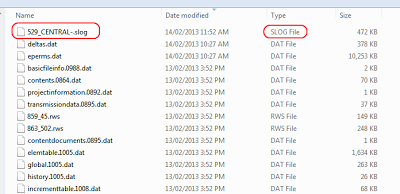
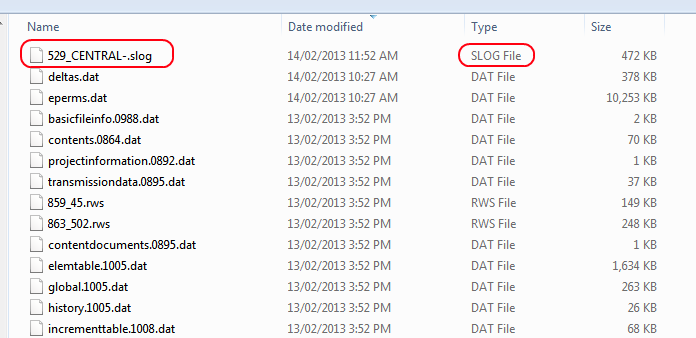
Note: you should be able to find the slog file under the _backup folder of the affected Central (order by Date modified):
Steve posted a few interesting things about Tags recently, including:
These categories are immune to Rotate with Component:
Foundations, Floors, Ceilings, Roofs, Furniture, Furniture Systems, Casework, Generic Models, Structural Columns, Detail Components, Massing, Mass Floors, Curtain Panels, and Specialty Equipment.
and
Architectural Columns, Shaft Openings remain immune to tagging at all.
Now, in the first instance, this proves again why some holistic Category Definition document is urgently needed. I have called for this a few times before, but I haven’t seen one yet. In relation to Steve’s post, the Category Definition document would have to further describe how the Tags of each Category operate…
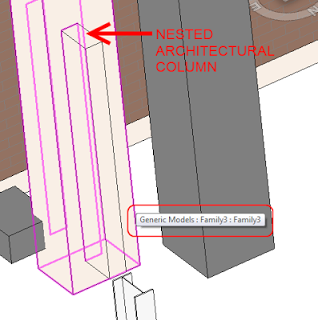
Secondly, I’m assuming that Steve means you can’t Tag by Category on Architectural Columns. Because you can use a Multi-Category Tag on Architectural Columns without any issue. Obviously, this is an annoyance. A couple of ideas on how to get around this:
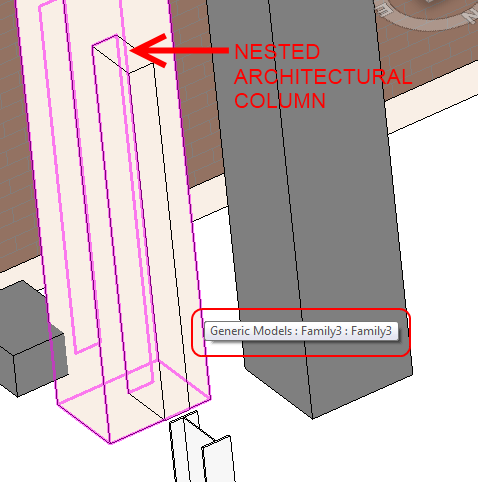
Read more:
Revit OpEd: Rotate with Component
I have reposted Alex Vysotskiy before. He recently uploaded a large set of Youtube videos, including a Basic Course and a course on the Family Editor. See playlists below:
Embedded playlist – Basic Revit Training:
Embedded playlist – Family Editor:
Read the main post on his blog:
Revit and its friends: Autodesk Revit Architecture 2013: Basic (free video on-line training)
Heads-up:
http://twitter.com/REVIZTO/statuses/301073717075783680
The task of adopting BIM can be very daunting for a small firm.
…
there will likely be negative consequences for not doing it.
…
the technology is evolving to have a democratizing effect on the design industry
…
There is no set guide on how to implement BIM.
…
There is no single tool that can handle all aspects of BIM
…
New team members who know current tools but don’t know much about design and construction can be a good compliment to a staff that knows how to design and build but doesn’t know the latest BIM tools.
…
If you are looking for a clear road map of how to deliver a BIM project, you won’t find it.
Read the full article by Kris Weeks at:
Braving the New World of BIM
BIM Aficionado posted a while back about using Generic Annotations and Note Blocks as a workaround for genuine Keynoting. I have posted about similar things before, although I am more proud of my Keynote Legend workflow.
In any case, he provides a full guide along with example files at this link:
https://docs.google.com/folder/d/0B_caWTSMFC8cZC1TSXRoUTdRVjItTWVsSGpXdGdPQQ/edit
Pretty interesting method, with the Excel CSV / Family Types too.
Read more / via:
BIM Aficionado: Generic Annotation Keynotes
A while back, RevitCat got me thinking about the rules associate with family swapping in Revit. Here are a couple:
Unless you can reverse engineer this bug, you will have to essentially follow RevitCat’s advice – to change just a single Type of a Family to a different Category, I would probably Edit the Family (from the Project Browser), save/rename it, load it, Select All Instances of the Type you want to switch, change it to the renamed version, and then use the method from the first bullet point above.
In response to:
RevitCat: Changing category of just one type in a Revit family
Another interesting point from his post:
If you plan to change categories of a family, it will appear to wipe out the sub-categories – but actually they are still there, hidden away; they may show up in the project listed under the old category in Visibility Graphics.
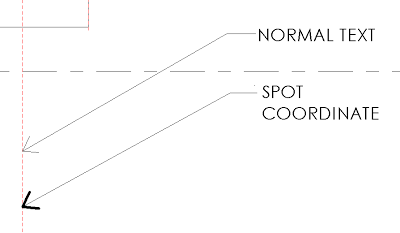
A recent post by Mark Cronin got me thinking… if you can control the arrowhead lineweight for Spot dimensions, can we hack one of these to make a piece of ‘text’ with adjustable arrowhead lineweights? The answer is yes:

Some people want absolute visual control. If you are one of those people, check out the example file and see if you can figure out how I did it:
Download
Thanks to:
Leader Arrowheads | betterREVIT
Mark also makes this comment:
So it appears as though the ability to control these parameters is indeed there (and has been for years)! But why can’t they be controlled for text annotation and keynotes, where they would be of most use?
Personally, I wonder whether Spot dimensions are a ‘newer’ element in terms of Revit version, so perhaps the Factory was able to introduce this visual control here, while still being unable to easily add it to existing elements like text.
EDIT
If you are wondering how to modify the text, you need to access the annotation symbol family that is referred to in the Spot Coordinate type definition:
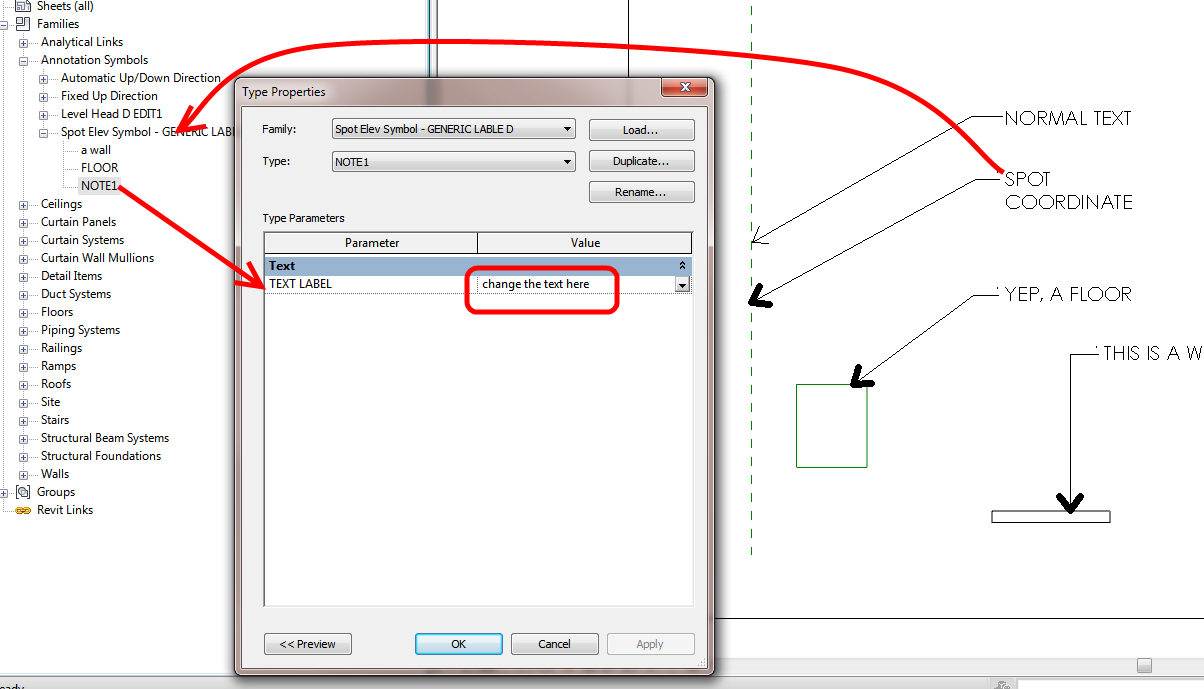
After modifying this property, you need to drag or just “touch” the spot coordinate to force it to regenerate.
“a challenge having multiple projects being designed in different versions of Revit.
Four years ago, the data transferred from these links was flawed or incomplete. Software lockups were common. With the advancement of the software, communication between Revit and analytical programs has improved but issues still remain. Four years later, the transfer is still not seamless.
Early discussions regarding clash detection expectations may lead the design team to model elements differently, for instance, just modeling the bond beams in bearing walls to avoid sifting through hundreds of non-critical clashes.
”
via
BIM: Four Years Later | Ryan Biggs