A playlist of 8 videos about Room Schedules:
From Youtube user – http://www.youtube.com/user/DesignInnovations/videos
Heads-up / original post via
REVIT Structure Learning Curve: Room Schedule Training Videos and more….
AI Empowered Project Management
A playlist of 8 videos about Room Schedules:
From Youtube user – http://www.youtube.com/user/DesignInnovations/videos
Heads-up / original post via
REVIT Structure Learning Curve: Room Schedule Training Videos and more….
“For those that have seen enough of the standard Revit textures, there are remedies.
Recently, the company offers under the name LG Hausys HI-MACS textures for download.
The free file can be found at this link:
http://www.himacs.eu/produkte/farben_2″

via
Google Translate
of
http://revitde.blogspot.com/2012/02/neue-texturen-fur-revit.html
This hotfix improves product stability when working with large datasets.
Make sure that Update Release 2 has been applied prior to adding the hotfix. Verify that the build number of Revit 2012 is 20110916_2132.
NOTE: This hotfix applies to the 64-Bit release of Autodesk Revit 2012 only.
The Readme contains the latest information regarding the installation and use of this update. It is strongly recommended that you read the entire document before you apply the update to your product. For your reference, you should save the Readme to your hard drive or print a copy.
 |
Readme (htm – 84Kb) |
 |
revit2012_mem_hotfix.zip (zip – 11247Kb) |
PHPP—the energy modeling software for the Passive House energy-efficiency standard—requires users to input wall areas calculated to the exterior of the thermal boundary. By default Revit does not calculate wall areas this way. Gregory Duncan Architect created a workaround to create a wall schedule that can export meaningful information to PHPP.
Read on at:
Revit and PHPP: Getting BIM and Energy Modeling Software to Work Together
 |
| Image from www.gduncan.us |
The concept of ‘scale’ is vital in design and Architecture. Have you ever wanted to zoom in or out of your current field of reference? This Flash page makes it easy:
Drag the scrollbar or use your mouse-wheel to zoom in and out of the universe.
Prepare to have your mind blown!
Go to:
Scale of the Universe 2012

This is the first WHQL-certified driver from the R295 family of drivers. It is the recommended upgrade for all GeForce users…
These drivers come packed with GeForce-exclusive performance and quality enhancements and are now Microsoft WHQL-certified.
Version: |
295.73 WHQL |
|
Release Date: |
2012.02.21 |
|
Operating System: |
Windows Vista 64-bit, Windows 7 64-bit |
|
Language: |
English (U.S.) |
|
File Size: |
157 MB |
|
 |
||
The Autodesk BIM for Architecture, Engineering, and Construction Management Curriculum can be freely accessed from here. Click on the various Units on the right hand side of the page.
For example, Unit 1 contains links to various whitepapers.
You can view all of the Curriculum videos here.

Heads up via:
Google Translate of Education – Curriculums BIM Revit Architecture pour les Professeurs en t�l�chargement gratuit ! – Village BIM
WSP Group is a global design engineering and management consultancy specialising in Property, Transport & Infrastructure, Industry and Environment projects.
They recently released a report entitled:
10 Truths about BIM
THE MOST SIGNIFICANT OPPORTUNITY TO TRANSFORM THE DESIGN AND CONSTRUCTION INDUSTRY
Personally, I find the following so-called ‘truths’ most challenging:
I’m unsure what is fully meant by ‘destabilise’ in point 4, but I guess if it means a shake-up, then that is probably true.
Point 9 is quite interesting – I think we are about to see a new battle in software – the battle for Data. At the moment, we have plenty of model creation tools, and none that truly dominate (Revit, ArchiCAD, Bentley are probably the best known). But the next phase of BIM software seems to be the client-server packages that store and present your data, such as VEO. You can read more about some of these competing technologies here.
In the report, it quotes from another article entitled CAD standardisation in the construction industry — A process view, which can be downloaded from here. This document makes an interesting observation with regard to ‘de facto’ file format standardisation:
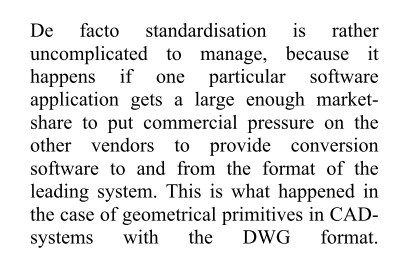
And its quite true – DWG, PDF and MP3 have gained ubiquitous status because they won the war to be the defacto exchange format for their particular medium. We don’t have that yet for BIM – but I guess it is coming…
You can download the full WSP report here.
What do you think? Have you read the report? Feel free to comment…
10 points via WSP blog post:
BIM: 10 truths about BIM
Heads up and PDF link via:
Village BIM

Here is the problem – I have two linked files, set as separate options in the same Option Set. If any of the Room elements overlap in the two linked files when placed in the host file, and I have the view set to a Secondary option, the Room Tag fails:
None of the created elements are visible in Floor Plan: UPPER FLOOR PLAN – Option 2 View. You may want to check the active view, its Parameters, and Visibility settings, as well as any Plan Regions and their settings.
If I move the link in the secondary option AWAY (geographically) from the link in the primary option, the Room Tags work fine.
The workaround that I am currently using is this:
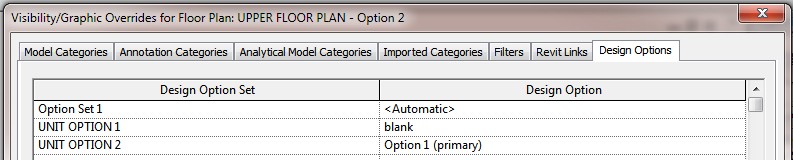
EDIT:
If the above doesn’t work for you, do this:
With full credit to Digital Tools for Designers, see below 6 classes divided into 7 videos that focus on Autodesk Revit 2012 for Interior Architects.
There is over 10 hours of free Revit instruction here. It starts at the most basic of topics (user interface), and proceeds to more advanced tasks.
Enjoy!


