“
the solids’ cut material when in Course Detail Level is controlled by a special Material called “Poche”.
“
Revit Learning Club Blog: Section Boxes in perspective views
AI Empowered Project Management
“
the solids’ cut material when in Course Detail Level is controlled by a special Material called “Poche”.
“
Revit Learning Club Blog: Section Boxes in perspective views
Rod Howarth has done a great job in responding to the challenge I presented a fortnight ago. He has created a simple yet effective program that analyzes your journal files and tells you the Top 20 commands that you are triggering WITH Keyboard Shortcuts, and the Top 20 commands you are triggering WITHOUT Keyboard Shortcuts.
Most of us realize that the fastest way to trigger a command is by using the keyboard. Yes, the Ribbon is lovely in its own way, but once you know what command you want, why would you want to spend 3 or 4 clicks getting there, when a simple press or two on the keyboard will do the same thing?
Here is a link to the Journal File Analyzer post by Rod.
Here is a direct link to the Journal File Analyzer program.
I will post later about the paths to use if you don’t know them already.
Also, don’t include “” marks in the path entries.

If you are looking for aerial images of Australia that are more up to date than Google Earth, check out:
You can multi-assign a shortcut key to the ‘Pick Lines’ subcommand – see image below:
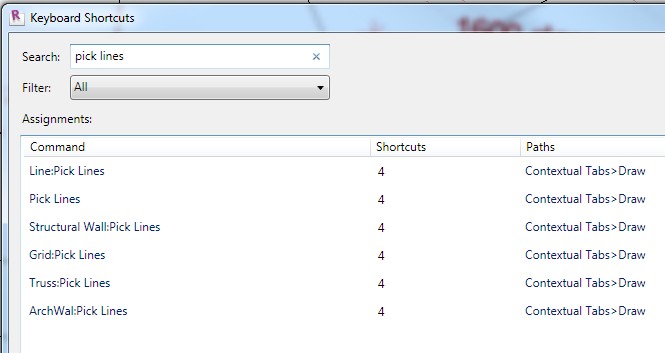
I’m sure you can see the benefit in doing this?
Revit Formulas for “everyday” usage
Great forum post from Klaus Munkholm – also author of Revit Forum Blog.
Revit 2012 information is giving me a bit of a headache…
This is how one guy responded to my recent post about Revit 2012:
If this is a real list of the most significant im provements… it looks like the description of some useful features of some witty plug-in…. why they do not work on the main part of the software….??!! I pay two subscriptions for this? Hopefully the real release will reserve us something more….
What do you think?
This is based on the Revit Benchmark. You may find it helpful if you are planning on purchasing some new hardware.
You will need to login to Revit Forum to download.
While the 2012 Suites have not yet been released via Subscription, you can still install AutoCAD 2012 by downloading it from the link below.
AutoCAD 2012 – Free Trial – Download AutoCAD Trial – Autodesk
Just be careful with entering serial numbers. If I were you, I would use it as a trial until the Suite products are properly released.