By Julien Benoit (nice job mate).
Source:
http://prezi.com/1wm_1gzxdx7s/?utm_campaign=share&utm_medium=copy&rc=ex0share
Embedded:
Heads-up:
https://twitter.com/Jbenoit44/status/353048442580385792
AI Empowered Project Management
By Julien Benoit (nice job mate).
Source:
http://prezi.com/1wm_1gzxdx7s/?utm_campaign=share&utm_medium=copy&rc=ex0share
Embedded:
Heads-up:
https://twitter.com/Jbenoit44/status/353048442580385792
Part of knowing What Revit Wants, is also knowing what it Does Not want. Sometimes, you can push the hack (or workaround) that step or two too far… and the result is unpredictable, buggy and kinda useless.
In the past, I have used various methods to create inplace or component families that are not ‘officially’ or natively available. In this particular instance, I used the IFC round trip method to force the creation of an Inplace family with Category set to Rooms. I also pushed this into a Component (loadable) family.
Great! I have Room families. But guess what? The result is unpredictable, buggy and kinda useless.
In fact, if you open these projects, make some Room Separation lines and then try to place a Room, I would estimate that in 95% of cases, your Revit has already crashed. The families will not accept a tag, and they won’t schedule. They seem to just sit there, destabilizing your Revit environment. So why post about it? Well, basically so that you can add this workaround to the aforementioned list of something that Revit (currently) does not want.
I have provided both 2013 and 2014 versions for your download and testing here:
RVTs that will crash Revit
Andy posted about re-creating furniture families in native Revit forms. He also provides a download link to some of the fruits of his labour. Read the whole post:
Shades of Grey: FURNITURE FRITZ
“You can find the downloads at the link below
Fritz Hansen Furniture Families“
I don’t normally post “paid” addins, but this is an interesting little idea for an app:
Assign a HotKey to a specific component, not just a command (link)
I wonder if someone would like to make a Revit add-in that allows mapping of a multi-step command to one hotkey? Here’s what I’m basically thinking:
“That’s the value of blogging and sharing your thoughts, your IP, your abilities—when you throw it out there, it can come back to you a hundredfold in the form of new clients, new opportunities and great personal brand exposure.”
Heads-up:
https://twitter.com/AutodeskAEC/status/356258801583788032
Daniel Monsén has created one of those addins where you just have to say “this makes sense”. The key feature of Bimframe Connect? It allows users to import and export data from Revit to a Google Spreadsheet.
The overall concept is that you can export data to a Google Spreadsheet, collaborate using a web client or mobile device, then import the data and update the Revit model. Collaborators obviously don’t need Revit – just access to the Google spreadsheet.
Personally, I love the idea. The more transparent the Revit building database is, the easier it is to add intelligence to the model, share the model, and detect design problems.
Overview:
The above video includes the following info:
Email: daniel@bimframe.com to get trial key.
Download the version 0.8 beta trial add in here:
https://drive.google.com/folderview?id=0BxQhjQerGcutN3RCV0lCS2pmeFk&usp=sharing
There is a series of tutorials on Youtube here:
http://www.youtube.com/channel/UC4_8PPGYG2g576rssp9ykCw/feed
Two new videos on Autodesk Building Solutions Channel. The first one shows how to use features of 3DS Max to quickly add animated people to an animation of a Revit model. Nice!
This one is about updating linked Revit models in 3DS Max:
Read Zach’s post:
http://buildz.blogspot.com.au/2013/07/dynamo-052-daily-builds-rtc-and-more.html
Daily builds (unintentional pun?) of Dynamo are available for download at:
http://dyn-builds-pub.s3-website-us-west-2.amazonaws.com/
Plug this into your RSS reader:
http://www.inoreader.com/stream/user/56667/tag/REVIT_FEEDS_RSS
I also burnt this feed to allow for easy subscribing (via email etc):
http://feeds.feedburner.com/Revit_feeds_rssInoreader
I previously had used a shared folder on Google Reader to aggregate all of this into one RSS via Feedburner (and then into PDF), but obviously that method is broken now.
Dare I say that I think that InoReader is going to be my Google Reader replacement…
Some other notes
Another way to view the Revit Feed reading list, check out:
http://www.feedspot.com/folder/4RTJsGUe
(this one will not be updated, as I think I’m going to go with InoReader, not Feedspot)
Another idea
I thought I had found a way to aggregate my Revit Feeds into one RSS for easy reading / viewing. Without getting into all the details, it uses a Yahoo Pipe to turn an OPML (containing many feeds) into one RSS feed, sorted by date. Here it is:
http://pipes.yahoo.com/pipes/pipe.run?_id=70129693f6803988c7fe858f4fb9822b&_render=rss&opml=http%3A%2F%2Fanonanon.p4o.net%2Fpipelist.xml
In the end, the result is not very predictable or reliable…
This is the pipe:
http://pipes.yahoo.com/pipes/pipe.info?_id=70129693f6803988c7fe858f4fb9822b
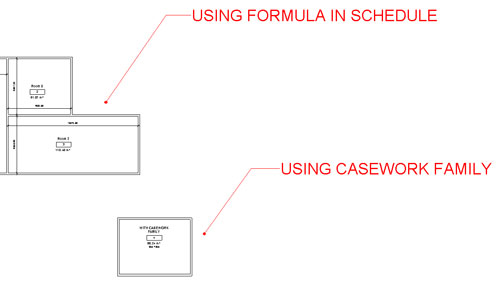
Revit deals in realities. The reality is, many Rooms are not rectangular. So we can forgive vanilla Revit for not having a built in tool or method that could only really ‘guess’ at X and Y room dimensions for irregularly shaped rooms.
There are two workarounds that I think can be useful:
I can’t take credit for the Calculation method. This uses a formula based on Perimeter and Area to establish calculated values for X and Y room dimensions in a Schedule. I downloaded an RVT back in 2008 that demonstrated this method — from … somewhere.
Similarly, I can’t really take credit for the Model Family with Annotation Labels idea for the family either. Daryl Gregoire posted it years ago in a series of videos, and it was mentioned in this post as well.
Download this file to see both methods in action. Be sure to review both the Floor Plan and the Schedules to see how it all works together.
I chose Casework because it has built in X, Y and Z parameters – meaning I did not have to use Shared Parameters. I control visibility by placing these Casework families on a secondary Design Option. You could actually use a standard Casework Tag instead of the built in annotation if you prefer. The Casework Schedule is filtered by Type Comments, and the other good thing about Casework is that we can Schedule the Room that the Model family lives in.
Feel free to comment, even if you think both methods are a bad BIM idea 😉